ExoCall has always analysed every call — lead label, score, sentiment, intent, summary. Useful, but it left the most important question to you: so what do I do now? You still had to read the summary, decide the follow-up, write the WhatsApp message, and guess whether that outbound campaign call actually reached the right person.
Today's update closes that gap. The analysis is now context-aware — it knows the call's purpose, campaign, and the caller's history before judging it — and it returns ten new fields that turn every call log from a record into a to-do.
Key Takeaway
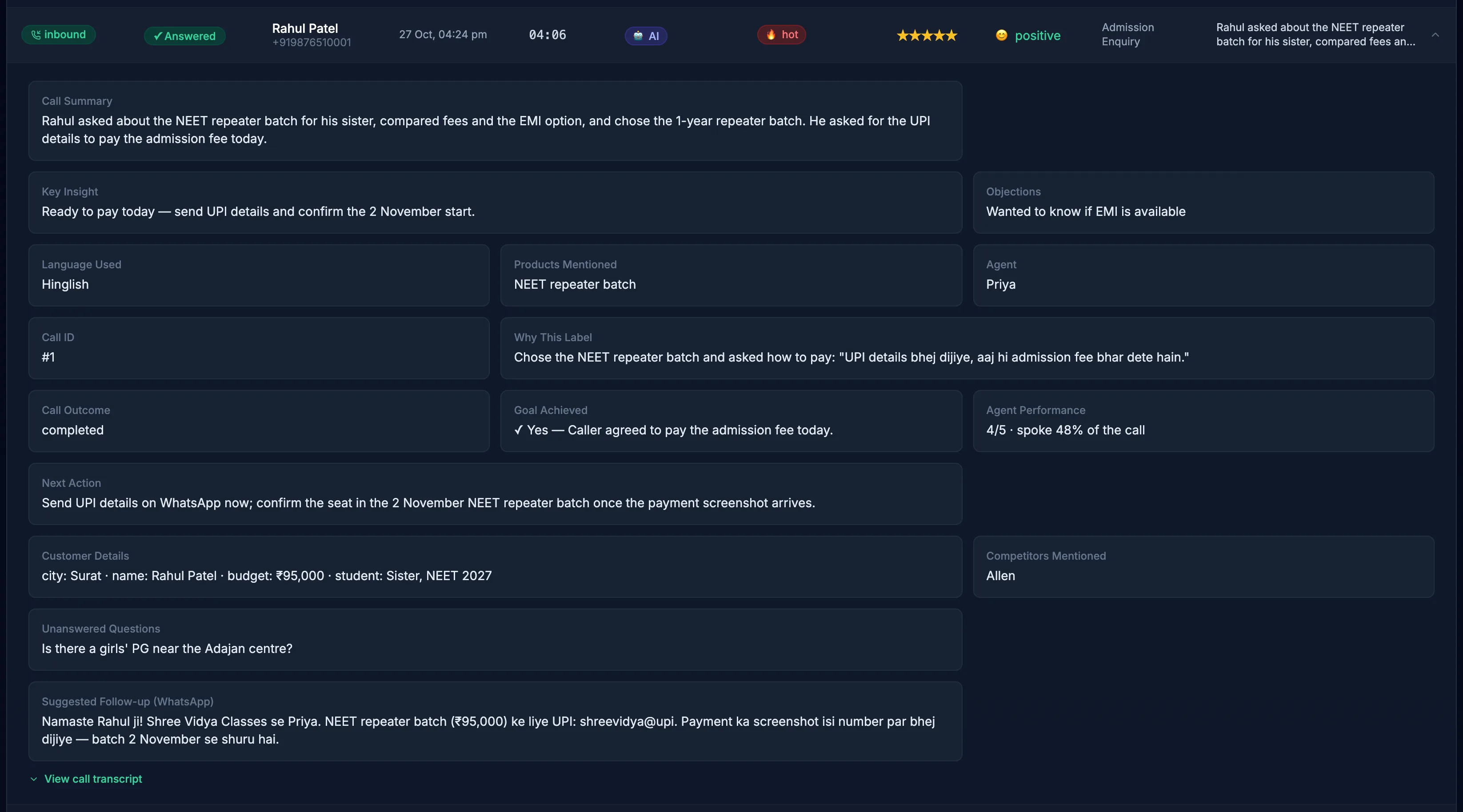
ExoCall's post-call AI analysis now detects the call outcome (including voicemails and wrong numbers), judges whether the call achieved its stated goal, recommends a concrete next action, drafts a ready-to-send WhatsApp follow-up in the caller's language, captures customer details and competitor mentions, and QA-rates the AI agent itself — automatically, on every call, in the dashboard, webhooks, and API.
The Analysis Now Knows the Story Behind the Call
Previously, the AI judged each call blind — just the audio, nothing else. Now every analysis is briefed like a sales manager would be:
Context passed to the AI with every call
The AI judges the call against its actual purpose — not a generic idea of a "good call".
This matters more than it sounds. "Customer said call back next week" is a failure if the goal was to close a payment today, and a success if the goal was to revive a cold lead. Context is what turns a rating into a judgement.
Ten New Fields on Every Call
| Insight | What it tells you |
|---|---|
| Call outcome | Completed, voicemail, wrong person, caller hung up early, or dropped — voicemail and wrong-number detection keeps junk out of your lead scores. |
| Goal achieved | Did the call accomplish its stated purpose? Yes or no, judged against the actual purpose you set. |
| Next action | One concrete recommended follow-up: "Send EMI plan on WhatsApp today, call back Thursday 11am." |
| WhatsApp follow-up draft | A ready-to-send message under 400 characters, written in the language the caller spoke. |
| Customer details | Name, city, email, budget — whatever the caller actually said, captured into the log. |
| Competitor mentions | Which rival products or companies came up in the conversation. |
| Unanswered questions | Questions the AI agent couldn't answer — your exact to-do list for improving the agent's knowledge. |
| Agent performance (1–5) | Automatic QA of the AI agent: talking over the caller, mishearing, repetition, wrong language. |
| Agent mistakes | A short description of what the agent got wrong, when it did. |
| Talk ratio | Approximate % of the call the agent spoke — a classic coaching metric, now automatic. |
What It Looks Like in the Dashboard
Expand any call in Call Logs and the new insights appear alongside the summary, recording, and transcript:
Your AI Agent Now Reviews Itself
The most quietly powerful part of this update is agent QA. Call centres employ entire quality teams to sample a few percent of calls and score agents. ExoCall now does this on 100% of calls, automatically — rating the AI agent 1–5 and recording what it got wrong.
Pair that with the unanswered questions list and you get a self-improving loop: every question your agent couldn't answer is a line you should add to its system prompt. Businesses that review this list weekly will watch their agent get measurably better month over month — no guesswork about what to fix.
Why Voicemail Detection Changes Campaign Maths
If you run outbound campaigns in India, a meaningful share of dials hit voicemail or the wrong person. Before this update, those calls could get analysed like real conversations — polluting lead scores and wasting review time. Now they're labelled for what they are:
Before
Voicemail greeting gets scored as a "cold lead, negative sentiment" — your campaign stats look worse than reality, and someone reviews a 20-second answering machine recording.
After
Outcome = voicemail. Filter them out of review, measure true connect rates, and see exactly which campaigns reach real people.
Bottom Line
Call analysis used to answer "what was said?" ExoCall now answers the questions that actually move revenue: Did we reach the right person? Did the call do its job? What exactly should we do next — and can the follow-up message write itself?
Live now for all ExoCall accounts
Every call analysed from today onwards includes the extended insights — in the Call Logs dashboard, the call.analyzed webhook, and the public API. No setup required.
Frequently Asked Questions
What insights does ExoCall's AI call analysis provide?
Every analysed call returns two layers of insight. The classic layer: lead label (Hot, Warm, Cold, Callback Requested, Not Interested), a 1–5 lead score, sentiment, intent, language, objections, a call summary, and a key insight. The new extended layer: call outcome (completed, voicemail, wrong person, early hang-up, or dropped), whether the call achieved its stated goal, a recommended next action, a ready-to-send WhatsApp follow-up draft in the caller's language, customer details the caller mentioned (name, city, budget), competitor mentions, questions the agent couldn't answer, and a 1–5 QA rating of the AI agent's own performance.
How does ExoCall know whether a call achieved its goal?
The analysis is context-aware. For outbound calls, ExoCall passes the call's stated purpose (for example "Confirm Thursday's demo booking"), the campaign name, the call duration, and the caller's previous call history to Gemini along with the recording. The AI then judges goal_achieved as true or false against that specific purpose — not against a generic notion of a "good call".
Can AI detect voicemails and wrong numbers on outbound calls?
Yes. Because ExoCall analyses the actual call audio, it can hear when an answering machine picks up or when the person who answered isn't the intended contact. These calls are labelled voicemail or wrong_person in the call outcome field, so they never pollute your lead scores and your team stops wasting time reviewing them.
What is AI agent QA and why does it matter?
After every call, the analysis rates the AI agent's own performance from 1 to 5 — deducting for talking over the caller, mishearing, repeating itself, ignoring questions, or using the wrong language — and lists any questions it failed to answer. This gives you a continuous, automatic quality review of your voice agent, and the unanswered-questions list tells you exactly what to add to your agent's knowledge so the next caller gets a better answer.
Do I get these insights over the API too?
Yes. All extended insights are included in the analysis_extra object on the call.analyzed webhook and on GET /api/v1/calls/{id}, so your CRM can route hot leads, schedule the recommended next action, and even send the drafted WhatsApp follow-up automatically.