When an AI calling agent gives a wrong or vague answer, the first instinct is to add more to its instructions: another paragraph about the product, another example, another "IMPORTANT: always…". A few weeks later the prompt is 20,000 characters long — and the agent is no better.
Looking across the agents on ExoCall, most businesses keep their Business Knowledge to a couple of thousand characters. But a few had grown to 10,000, 20,000, even over 30,000. So we've added two things: a character counter on every prompt box, and a Shorten with AI button that rewrites a long prompt into a short one.
Key Takeaway
A voice agent re-reads its entire prompt every time it speaks, live, on the phone. Shorter, well-organised instructions help it find the right answer quickly. ExoCall now shows a counter on the Agent Persona, Business Knowledge, opening instructions and call scripts, and Shorten with AI turns long text into short bullet points — keeping every fact, and saving nothing until you review it.
Why a Long Prompt Hurts an AI Phone Agent
A chatbot can take its time. A phone agent can't — the caller is waiting in silence. Every time your ExoCall agent replies, the AI reads its whole prompt again, together with the conversation so far, and has to answer within a second or so. A bloated prompt works against it in three ways:
- The right fact gets buried — the fee for one course is somewhere in a 15,000-character wall of text, next to three older fees that were never deleted. The agent has to pick the right one, live.
- Instructions start to fight — "always push for a booking" on page one and "never pressure the caller" on page four. The longer the prompt, the more of these quietly pile up.
- Answers get longer and vaguer — an agent fed long paragraphs tends to speak in long paragraphs. On the phone, people want one or two short sentences.
New: A Character Counter on Every Prompt Box
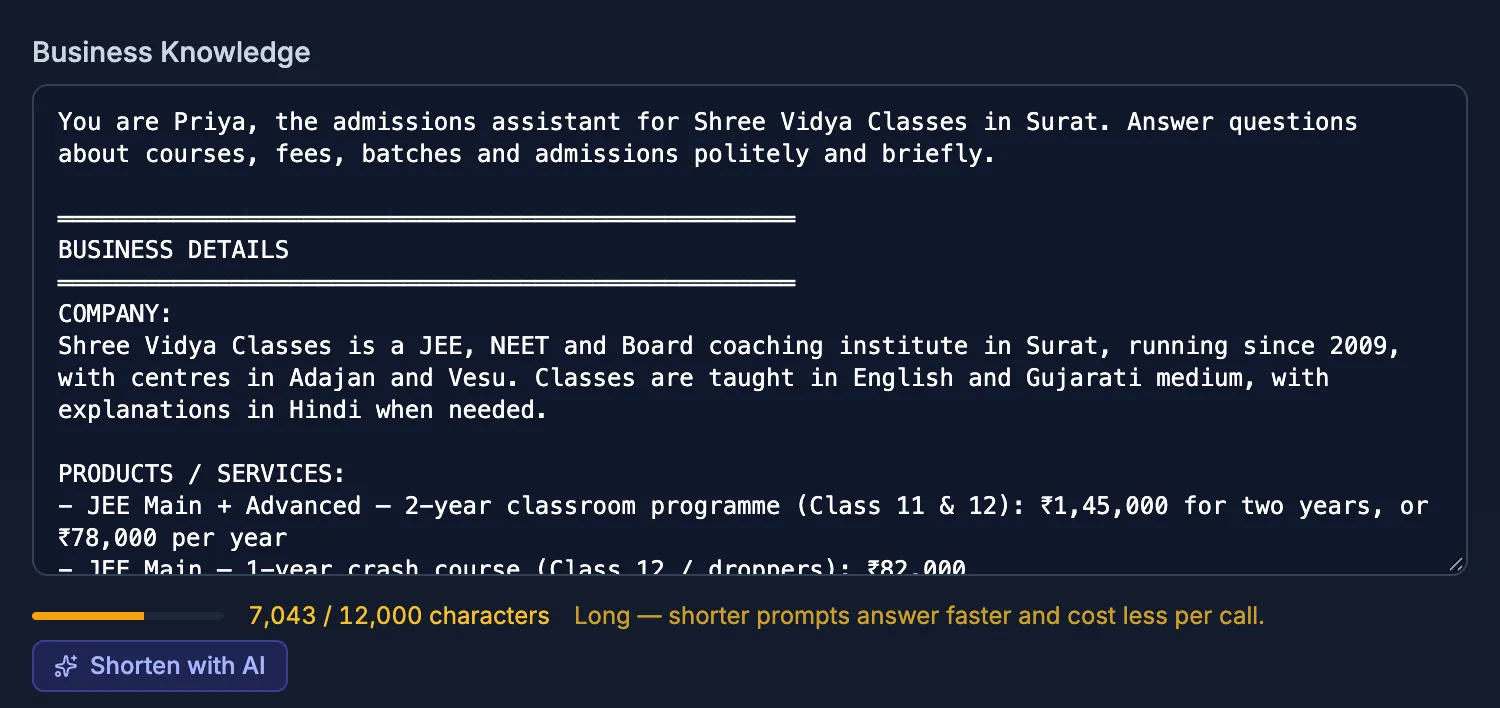
Under each prompt box you now see how long it is — for example "4,797 / 12,000 characters" — with a small bar that turns amber when the text is getting long and red when it's over the limit.
| Prompt box | Turns amber at | Limit |
|---|---|---|
| Agent Persona | 1,500 characters | 3,000 characters |
| Business Knowledge | 6,000 characters | 12,000 characters |
| Inbound / Outbound Opening Instruction | 400 characters | 500 characters |
| Campaign Call Script | 2,000 characters | 4,000 characters |
| Outbound Call Purpose | 2,000 characters | 4,000 characters |
The limits are generous — 12,000 characters of Business Knowledge is room for a full price list, FAQs, policies and contact details written as bullet points. And if your prompt is already over a limit, nothing breaks: your calls keep working, and you can still save your other settings. You just can't make that box any longer until it's trimmed.
New: Shorten With AI
Once a box turns amber, a Shorten with AI button appears next to the counter. One click, a few seconds, and your text comes back rewritten as short headings and bullet points. It is told to:
Keep
Every price, plan, discount, number, name, phone number, email, website, address, timing, policy and payment detail — and every instruction that changes how your agent behaves. In the language you wrote it in.
Remove
Repetition, filler, marketing language, long explanations, example dialogues that only repeat a rule — and copies of rules ExoCall already adds on every call.
- Nothing is saved automatically — the shortened text only goes into the box. Your calls don't change until you press Save.
- Undo is one click away — if you don't like the result, Undo puts your original text back.
- Works on every prompt box — Agent Persona, Business Knowledge, campaign call scripts and outbound call purposes.
We tried it first on our own demo agent — the one that calls you when you book an ExoCall demo. Its Business Knowledge went from 10,690 to 4,797 characters and its persona from 2,926 to 1,398, with every plan price, minute allowance, address and phone number still there. On test calls it still answered every question, and refused, politely and repeatedly, when we tried to get it to ask for an OTP.
What You Don't Need in Your Prompt
A lot of long prompts are long because they repeat rules ExoCall already gives the agent on every call. You can safely leave these out:
- When and how to end the call — the agent asks if there's anything else, says goodbye and hangs up on its own.
- Transferring to your team — added automatically when call transfer is switched on, including your transfer hours.
- Sending details on WhatsApp — added when WhatsApp is connected.
- Call conduct rules — say which business is calling, never ask for an OTP or card details, never threaten or pressure, and stop calling anyone who asks — see our guide to Do Not Call and TRAI rules.
- The caller's name and past calls — ExoCall adds what it already knows about the caller, so you never need to write it in.
How to Shorten Your Agent's Prompt Today
- Go to Settings → Business & Agent and look at the counter under Agent Persona and Business Knowledge.
- If either is amber or red, press Shorten with AI.
- Read the result. Check your prices, timings and contact details — add back anything you think matters.
- Press Save Settings, then make a test call and ask your agent the questions your callers ask most.
- Do the same for long campaign call scripts on the Campaigns page.
Bottom Line
The best AI phone agents work from short, clear, up-to-date facts — the same way a good receptionist works from a one-page cheat sheet, not a 40-page manual. ExoCall now shows you when your agent's prompt is getting long, and Shorten with AI gets it back into shape in seconds, without losing the details your callers ask about. If you're starting from scratch, ExoCall can also draft your agent from your website — already in this short style.
Try it free
Book a free AI call demo and our agent calls you in seconds. Ready to set up your own? Request the free trial — 30 minutes of AI calling over 3 days, with the phone line and AI included, once we verify your business.
Frequently Asked Questions
How long should an AI calling agent's prompt be?
As short as it can be while still holding every fact the agent needs. In ExoCall, aim to keep Business Knowledge under 6,000 characters and the Agent Persona under 1,500. Short bullet points under clear headings — prices, products, timings, policies, contact details — work far better on a phone call than long paragraphs.
Does Shorten with AI remove my prices or phone numbers?
It is told to keep every fact: names, prices, plans, numbers, discounts, phone numbers, emails, websites, addresses, timings, policies and payment details, plus every instruction that changes how your agent behaves. It removes repetition, filler and marketing language. Always read the result before saving — if anything is missing, press Undo or add it back.
Is the shortened prompt saved automatically?
No. Shorten with AI only replaces the text in the box. Nothing changes on your calls until you review it and press Save. An Undo link puts your original text back.
What happens if my prompt is already over the limit?
Your calls keep working exactly as before. You can still save your other settings; you just can't make that box longer. Shorten it — by hand or with the button — whenever you are ready.
Do I need to write call ending, transfer or WhatsApp rules in my prompt?
No. ExoCall adds those automatically on every call — when to end the call, how to transfer to your team, when to send WhatsApp details, and the call conduct rules (never asking for an OTP, honouring "don't call me again" and so on). Leaving them out of your own prompt keeps it short, and Shorten with AI removes copies of them for you.